
Ready to Turn Your Page Into a Full-Time Income?
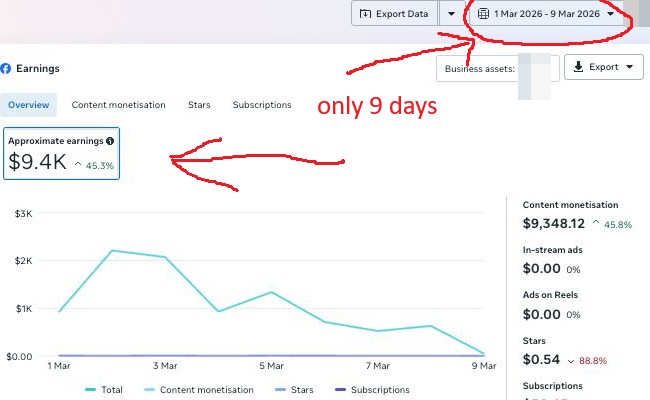
That screenshot shows $9,400 earned in 9 days by a real page in our partner program using Facebook Content Monetization. We join as a 50/50 partner — handling strategy, setup, and scaling while you keep running your page. Submit your page link and we will tell you if it qualifies.
Your Page Isn't Eligible Yet — But You're Closer Than You Think
Thanks for applying for the 50/50 partnership. Your page doesn't meet the requirements right now, but with the right system you can close the gap faster than you'd expect.
Facebook Monetization Suite
The complete toolkit: automation, content systems, and a proven strategy to take your page from where it is to fully monetized.
Show Me the Suite →Facebook Elite Consulting
For serious publishers who want expert eyes on their page and a tailored plan to scale toward $30K+ months.
Talk to an Expert →Hit the requirements later? Come back and re-apply anytime.
Facebook Page Monetization Calculator — Progress Tracker
Knowing exactly how far you are from each monetization threshold turns a vague goal into a concrete action plan. This progress tracker shows visual progress bars for every key requirement across all four Facebook monetization programs. Enter your current stats and optionally your weekly growth rates to get a timeline estimate for when you will qualify.
Frequently Asked Questions
What does the progress tracker measure?
The tracker measures your current page stats against the specific numeric requirements for each Facebook monetization program. Visual progress bars show you instantly whether you are 20%, 60%, or 95% of the way to each threshold. If you enter weekly growth rates, the tool calculates an estimated timeline to reach each unfulfilled requirement — turning abstract goals into concrete deadlines.
How long does it typically take to qualify for Facebook monetization?
For CMP with a 5,000-follower requirement, pages that post Reels consistently typically qualify in 2-6 months. Pages posting less frequently may take 6-18 months. The Reels Overlay Ads threshold (100,000 plays in 30 days) often takes longer than the follower threshold — it requires consistently high-reach content rather than just time. Pages with viral content can cross both thresholds simultaneously in a much shorter timeframe.
What does "almost there" mean in the eligibility check?
"Almost there" means you meet all requirements for a program except one. This is a valuable status because it means a single focused action will unlock monetization. If you have 5,000 followers but only 3 Reels posted when 5 are required, posting two more Reels is the only thing standing between you and eligibility. The progress tracker identifies exactly which single gap remains so you can prioritize it.
Should I track my progress toward CMP or the old programs?
Track against CMP since it is the current framework for new creators. The old programs' metrics like 600,000 minutes viewed are no longer the primary gate for most creators. If you are in a region where CMP is available, focus on reaching 5,000 followers as your primary milestone. Check Creator Studio's Monetization tab regularly — it shows your actual eligibility status in real time based on Facebook's current data for your page.
What should I do once I meet the eligibility requirements?
Apply immediately through Creator Studio. Go to your Facebook Page's Monetization section, select the program, review the Partner Monetization Policies, and submit your application. Have your payout account ready — bank account or PayPal details are needed during setup. Apply for all programs you qualify for at the same time to start earning from multiple streams immediately after approval rather than applying one at a time.
Does the progress tracker reset if I change my page name or category?
Changing your page name does not reset any metrics — all accumulated stats carry over. Changing your page category can trigger a review if the new category has different eligibility criteria or policy requirements. Significant page type changes (converting a personal profile to a page, for example) may affect accumulated history. Keep your core page identity consistent as you build toward monetization thresholds.
Progress Bars
Green bars indicate requirements you have already met. Amber bars show you are within 30% of the requirement. Red bars indicate significant gaps remaining. Focus your energy on the closest unfulfilled requirement — the one with the longest amber bar — since reaching it will unlock the highest-value monetization program for your current growth stage.
Timeline Estimate
The timeline estimate uses your weekly growth rates to project when you will cross each threshold. Growth rates are not always linear — a viral Reel can compress a 6-week timeline into days. Use the estimate as a planning baseline, not a guarantee. If your current growth rate produces a very long timeline, it may be time to experiment with posting frequency, content format, or audience targeting.
Growth Rate Input
To get an accurate timeline estimate, calculate your weekly growth rate from the past 4 weeks of actual data in Facebook Insights. Look at follower growth and Reels plays in the Insights tab of your Creator Studio. Use a 4-week average rather than your best week to get a realistic estimate. If your growth is accelerating, use last week's rate; if it is slowing, use a more conservative 4-week average.
What Happens Next
Once your progress bars are fully green for a program, navigate to Creator Studio and look for the Monetization section. Click "Apply" for each program you qualify for. The application review takes 1-5 days typically. After approval, your videos and Reels will begin showing ads immediately. Set up your payout account during the application process so earnings are sent without delay once you start earning.
More Free Tools
Video Timestamp Generator
Generate YouTube chapter timestamps, validate against YouTube rules, and get deep-link URLs per chapter.
Bar Name Generator
Generate creative pub, bar, and tavern names by style: dive bar, speakeasy, cocktail lounge, tiki bar, and more.
Base64 Encoder & Decoder
Encode text to Base64 format or decode a Base64 string back to plain text.
What Is My IP Address?
See your public IP address, location, internet provider, and timezone.